
This article was written without AI (well, almost)
No em dashes were harmed in the writing of this article, and the dubious puns, repetitions and excessively long sentences were produced by my own fat fingers, on a device of the Logitech keyboard variety.
That said, I’m not a caveman either. I still use whichever LLM happens to be handy (Codex at the moment) to:
- Fixx teh speling misteaks
- Smooth out awkward syntax
- Spot repetitions, something I tend to overdo
- Generate article summaries / tables of contents
- Translate into English
Accepting cookies in the 2020s
I don’t know about you, but personally, I love clicking buttons on cookie consent banners. My favourite thing is opening the IAB partner list, although I also love rejecting cookies, then being tempted to subscribe so I can reject them, but actually no, I’ll accept them and OH BUT WHY IS THIS REVOLUTIONARY SHOWER HEAD TAKING BAIN-DE-BRETAGNE THIRTY-FIVE THOUSAND BRITTANY BY STORM (yes, my attention span can sometimes be rather limited).
The fact is, clicking cookie consent banner buttons is my little guilty pleasure, much like other people enjoy crosswords, table tennis, or insulting people on League of Legends. Please respect that.
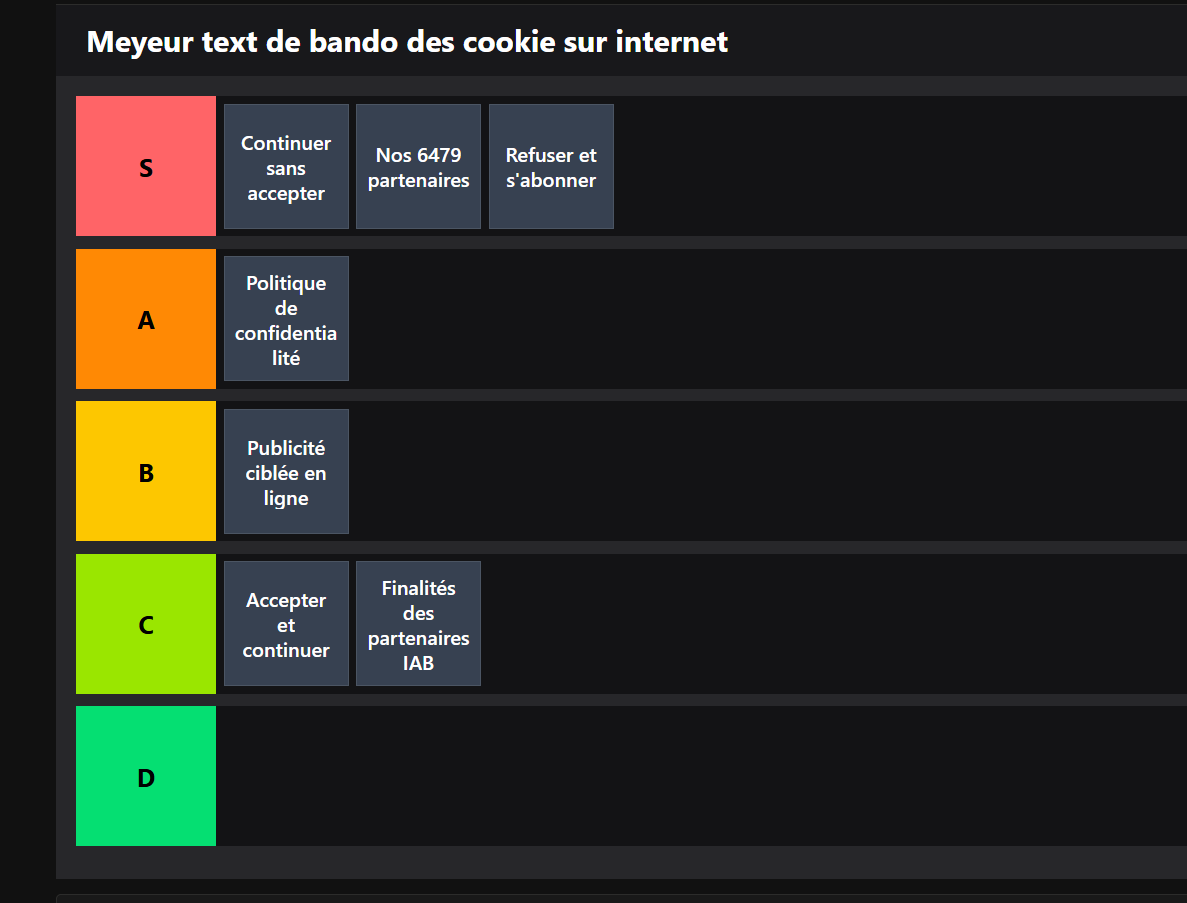
So beyond this wholesome pastime, if I click a lot of cookie consent banners (let’s just call them CMPs, for Consent Management Platforms, we’re among friends here), it’s also, and above all, because that’s how I make a living. Not exclusively, mind you, I also do things with GCP and Piano. But fundamentally, we have to acknowledge that for the past five or six years, you haven’t been able to approach an analytics setup with any peace of mind without a properly configured CMP.
I’m not going to retell the entire history of CMPs since the fall of the Byzantine Empire. That would probably take far too long (and frankly, the bit between the fall of the Byzantine Empire and the Cuban Missile Crisis isn’t all that interesting). But essentially, it unfolded as a trilogy with episodes of varying quality and intensity, rather like The Matrix, or the lettuce-tomato-onion combo at the kebab shop down my street (hello to the owner, a loyal reader of this blog):
- Phase 1 (before 2012): everyone sets cookies with complete impunity.
- Phase 2 (2012–2018): everyone sets cookies with complete impunity, but adds a floating banner saying they’re setting cookies with complete impunity.
- Phase 3 (since 2019): WE NEED A BANNER WITH THE IAB FRAMEWORK BUT IT HAS TO BLOCK BROWSING BUT NOT TOO MUCH AND THE REJECT BUTTON HAS TO BE AT THE TOP BUT NOT TOO HIGH AND HOW THE HELL AM I SUPPOSED TO IMPLEMENT MY HEADER BIDDING AND DOESN’T SERVER-SIDE MAKE ALL THIS A BIT POINTLESS ANYWAY HONESTLY I DON’T KNOW I JUST WANTED TO WRITE AN ARTICLE ABOUT CMPS WHAT HAVE I GOT MYSELF INTO
Right, yes, things have become a tiny bit more complicated over time. So now that we’ve politely glossed over the historical part, let’s take a quick look at the solutions available on the market, at least in Europe, in no particular order other than “it came to mind while I was making this list”:
- Axeptio
- Didomi
- Tarte Au Citron
- Complianz
- OneTrust
- Sirdata
- CookieBot
This list includes an open-source solution, others whose prices can reach several thousand euros a month for big websites, features ranging from a simple banner to centralised consent management across your website and app, some that are fun and playful, and others that seem to have copied their design from the French tax authority’s website. For those of us who spend our days working with these tools, it’s already complicated. But for the poor little website worried that some activist (or even the CNIL, France’s data protection authority, although they’re busy fixing their printer so they can send formal notices, the toner is out, nasty business) might report them for illegally setting an fbclid cookie without consent that is freely given, informed, revocable, recorded, unambiguous, made in France, two coffees, the bill please, yes do say hello to Micheline for me, with an equal opportunity to accept or reject; well yes, for that website, it’s a bit complicated. And most of the time, you end up with a CMP that inherently adds friction to the user experience, yet isn’t even configured properly, with cookies living their best free and autonomous Montessori lives.
Is being a CMP a good job or a bad job?
Which brings us to today’s exercise: I’m going to assume I own a website that will, at some point, need to set some form of cookies. Essentially, I have at least one analytics tool (GA, for example) and an advertising platform I need to send events to (Meta or TikTok, for example), while respecting user consent. First and foremost, I want clean data collection that follows the CNIL’s guidelines and recent formal notices. But I still want to maximise consent, to keep the advertising platform algorithms happy and get conversion figures by traffic source in GA that aren’t completely wrecked.
So I’m excluding the following features (please put your pitchforks away), at least for now:
- No, I don’t want a monitoring dashboard showing acceptance / rejection rates with a bit of segmentation.
- No, I’m not looking to implement different user experiences based on user location. We’ll stick with what works in France and, broadly speaking, much of the EU.
- Frankly, if you work for a website that monetises its audience and therefore has an ad server, I’m not entirely sure what you’re doing here. You spend your life negotiating with Taboola, GAM and friends. I have a lot of sympathy for you, and you’re welcome here, but honestly, just keep using Didomi. Also, stay strong.
- No, I’m not looking to run wild A/B tests to optimise the consent rate by tweaking the opacity of the “continue without accepting but are you really sure come on no okay fine kisses” button. I like risk, but I have better things to do.
- “Yeah, but I want to manage my cookies through an interface, because to deploy anything I have to open a ticket with the dev team and that adds to my mental load.” => Yes, and I want to save you money and improve your web performance. If you want an admin interface, talk to your developers. Otherwise, face reality: do you add new vendors often?
- “I have Shopify, how do I integrate this into my checkout?”
Yes
- No, Vincent, I don’t want to build a consent wall either. Please get back to whatever you were doing.
- Maybe we’ll look at it later, but no, we’re not going to implement proof of consent collection. Just for fun, here’s a translation of what the CNIL says about it:
Placing the computer code used by the organisation collecting consent in escrow with a third party, for the different versions of its website or mobile application, or even simply publishing a timestamped digest (or “hash”) of that code on a public platform so its authenticity can be proved retrospectively.
Honestly, at this point they could have written it in alexandrine verse and it wouldn’t have been any more beautiful. So no, no placing computer code in escrow with a third party.
cmp_detailed_functional_speficications_v4_client_feedback_final_1_final_patrick_feedback.pptx
Here’s the specification, then. Get your User Stories ready (yes, I’ll give you the mandatory six minutes for your Confluence page to load):
- The CMP must be blocking. Yes, BLOCKING. It should still hint that there’s some content behind it (that’s what the user came for, after all), but it needs to hit them in the face like the bouncer at the Pacha Disco Club’s ’80s night, and only let them out (well, in) once they’ve made their choice in good conscience. And if a UX / UI designer happens to wander through here (unlikely, but you never know), yes, Célestin (in my world, all designers are called Célestin), I’m aware this adds friction. But in case nobody told you, Célestin, there’s a very simple reason this CMP has to block browsing: if the user accepts cookies, they need to do it on their first page view. Because that’s where they have those lovely UTMs your CRM manager carefully added (unless Safari decides to strip them, but that’s another story). That’s where they still have a nice Google (or OpenAI) referrer. That’s where we know both where they came from and, incidentally, can get their consent to tie that information to our analytics tool. So yes, a blocking banner, and properly blocking at that. Sorry, Célestin, though I do respect your work. By the way, could you make the CTA bigger on the cart page? Thanks.
- On the first banner layer, we want:
- A concise paragraph listing the number of vendors using cookies or similar technologies, and describing the categories you’ve set up, where applicable.
- Another concise text explaining that consent for these partners can be withdrawn at any time.
- If you use Google tags, a specific mention that the website uses Google-related tags, with a link to https://business.safety.google/privacy/. I know it might sound like a joke, but I’ll come back to this later. And I think those who know, know.
- A link to the privacy policy.
- Still on the first layer, we want three buttons:
- “Allow all cookies”, visible, bottom right, attractive, on-brand, friendly. A button you’d like to spend some quality time with. A button you could absolutely take out to dinner for a sincere and pleasant evening.
- “Continue without accepting”, inside the banner, top right. Yes, INSIDE the banner, not outside on a transparent background. Some clever people have received formal notices for that. The CNIL probably has the equivalent of goal-line technology, but with “Continue without accepting” buttons instead of a football. You can’t stop Progress©.
- “Customise my choices”, bottom left. Visible and friendly, but still a little less so than the button that accepts cookies.
- Now for the second screen:
- Strictly necessary cookies are listed in their own category, shown first, with a design that differs from the other categories.
- This screen displays all advertising partners (in IAB jargon, we’ll call them vendors). Each vendor has an expandable text briefly describing what it does and why it sets cookies. Each partner has an accept / reject toggle.
- Vendors can be grouped into categories (“Marketing”, “Analytics”, “Reselling data to Russian platforms”… Knock yourselves out). Again, to keep things simple and consistent with market terminology, we’ll call these purposes. A toggle lets users accept / reject each purpose as a whole. For a new user, all vendors are set to denied on arrival at this screen. Obviously, when it’s reopened, the toggles reflect the consent previously granted (or not, as the case may be).
- If we need Google’s Consent Mode (we’ll call it CoMo to save space), we show it on this screen too, explicitly using Google’s categories (Analytics Storage, Ad Storage, etc.). Yes, that’s more text. Yes, nobody quite knows what new synthetic drug the inventor of Consent Mode at Google was on when they decided to, and I quote from memory (reliable), “do their own thing because why not”. But given the ambiguity surrounding Consent Mode, I’d rather cover myself by displaying this very explicitly, as only Axeptio does to my knowledge. So we explicitly display ad_storage, analytics_storage, ad_user_data and ad_personalization.
- This preferences screen has a “Save my preferences” button, and that’s it. Preference changes (writing or updating the cookie, then dataLayer.push, more on that later) only take effect when this button is clicked.
- The CMP must be accessible at any time through a footer link (for a wildly original label, “Change my cookie choices”).
- An important note, especially for Didomi users. Yes, I know that in my model (and, to my knowledge, that of most CMPs), a vendor belongs to one and only one purpose. In the IAB model, and therefore Didomi’s, the purpose / vendor relationship is many-to-many rather than one-to-many. Which means that if you reject the “Advertising” purpose, you’re not rejecting Facebook cookies. Well, not entirely. But sort of. Let’s be honest, about 0.000024% of your users visit this screen and fiddle with the buttons. The problem is that all those users are either DPOs or “tracking compliance” consultants. That doesn’t solve anything, but let’s say we’d like to preserve our sanity, so a vendor belongs to just one purpose. There.
- It goes without saying that the CMP must keep appearing until a choice has been made.
Integration with GTM
Now we’re getting to the crunchy, gooey centre of our exercise. Because essentially, I think this is precisely where most platforms on the market produce, and I’ll put this very delicately, an enormous pile of shit. To sum up, I think many of the people who designed the CMPs on the market don’t understand much about GTM and almost systematically miss the mark. And without naming names (yes, yes, Tarte Au Citron), I think some platforms are broadly unaware that a mark even exists.
And heeere we go. Here’s the technical brief for GTM. Bring your best Agile Coach, we’re speccing this for sprint 14 (nobody knows when it’ll happen, but we know it’ll probably be somewhere between 13 and 15):
The cookie
We want a readable cookie reflecting user consent, meaning it tells us every vendor they’ve consented to, along with the CoMo categories, following the same principle but with their own reserved prefix. Basically, something like this:
{
    'meta' : 'granted',
    'tiktok' : 'granted',
    'linkedin' : 'denied',
    'como_analytics_storage' : 'granted',
    'como_ad_storage' : 'denied'
}
As a bonus, we’ll even add some metadata:
{
    'last_consent' : 321654897 // Timestamp of the last acceptance, empty by default
}
To avoid making our browser implode (or at least contributing to that), we encode all this in base64 and cover the cookie settings properly:
- Domain: explicit top-level domain, or the full domain if we don’t intend to use multiple subdomains.
- Path: /, to make the cookie available everywhere.
- Secure: enabled, because we have some self-respect.
- SameSite: Lax.
By default, when the CMP first appears, before any choice is made, the cookie is set (yes, I know that might seem a little counterintuitive, but we’re allowed to set a cookie without consent if it lists the cookies that need consent), and of course all vendors are considered “denied”.
On that note, I’m deliberately using “granted” / “denied”, which is more CoMo terminology but has the advantage of being explicit. We could replace these with booleans, but it wouldn’t change the substance.
For me, nothing more, nothing less. Obviously, the cookie must update live whenever consent changes. This is absolutely crucial: the cookie must be updated before the dataLayer.push instructions, which we’ll discuss in fewer than 200 characters.
The idea is to have an extremely readable, simple cookie that doesn’t require a 60 kB JS library to decode (oh hi IAB).
As for the cookie’s lifetime, we’ll play it safe and stick to a fixed six months. No renewal mechanism should be implemented.
Communication with the data layer
Here again, many CMPs are completely out of control, doing either too much or too little (and surprisingly, sometimes a bit of both). When in reality, it takes next to nothing for your tags to work extremely efficiently.
We therefore need dataLayer.push calls in the following cases:
- By far the most important: whenever there’s a consent change, we push it to the DL. Specifically:
dataLayer.push({
    'event': 'cmpInteraction',
    'cmpInteraction' : {
        'action' : 'consentChange',
        'changeType' : 'First Consent' //String: 'First consent' or 'Ulterior consent'
    }
})
By “consent change”, I mean accepting everything, clicking “Continue without accepting”, or clicking the confirmation button on the preferences screen. That’s precisely why we don’t complicate things with partial rejections, such as the CMP disappearing. And we’ll carefully distinguish first consent from subsequent consent so we can trigger our GTM tags differently (more on that below).
- Optionally, when the banner appears (e.g. “cmpDisplay”), distinguishing the initial display from reopening through the footer:
dataLayer.push({
    'event': 'cmpInteraction',
    'cmpInteraction' : {
        'action' : 'display',
        'displayType' : 'Website load' //String: 'Website load' or 'Footer'
    }
})- Also optionally, we can push an event when the various buttons are clicked:
dataLayer.push({
    'event': 'cmpInteraction',
    'cmpInteraction' : {
        'action' : 'button click',
        'button' : 'Continue without accepting' //String: button label
    }
})
I imagine many of you are wondering why I’m not pushing vendors into the data layer. First, because I do what I want, it’s MY CMP. Also, because I consider the cookie a perfectly reliable source of truth. And if you remember, I’m very explicitly asking for the cookie to be updated before the dl.push. If you don’t get it, give it a minute. The GTM section will make it clear.
You’ve probably also thought: “Hey, little man, you’re forgetting the Gtag calls! Do you want to go to prison or what?” A great philosophical question. We could indeed add them; that wouldn’t be outrageous. But I prefer managing them in GTM too. We’ll come back to that below as well.
The GTM configuration
I’m not going to catalogue the horrors I see every day in the CMP management of GTM setups I inherit. It’s true that the platforms don’t exactly help (see the earlier remark about missing the mark), but if I take Didomi / Axeptio / OneTrust, the most common trio in France, their interactions with GTM differ, yet each follows a fairly clear logic. Even so, I see things in GTM that are the equivalent of this enduring classic of a meme:

As you’ve gathered, the cookie / data layer duo on the front end is very lean, so GTM will be too.
Reading the cookie
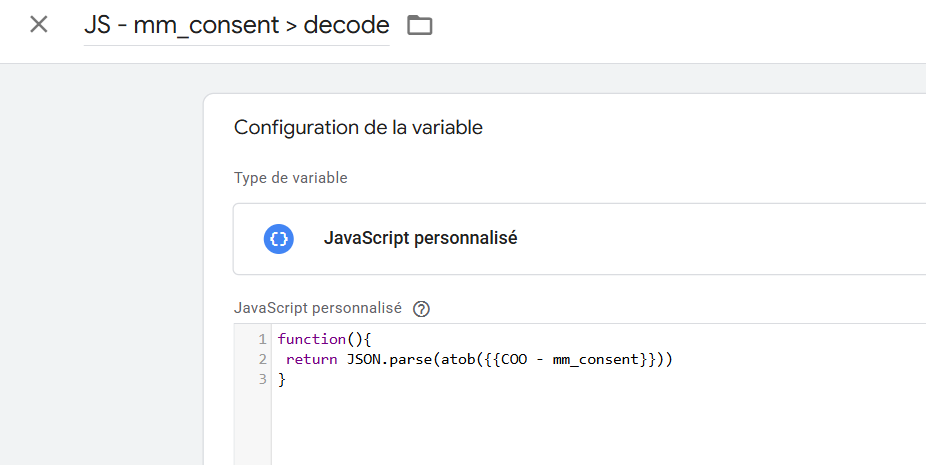
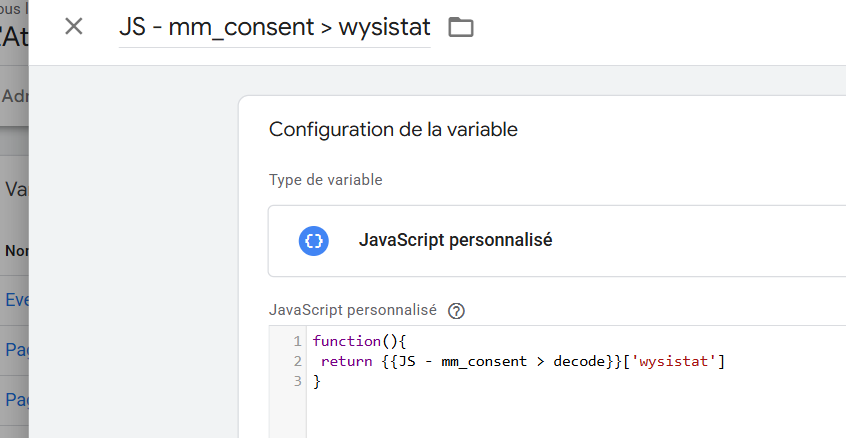
Our cookie is the source of truth. Let’s say it’s called “mm_consent” and is base64-encoded. We’ll need to work through several steps.
1/ Read the cookie (I think you’re still with me so far).
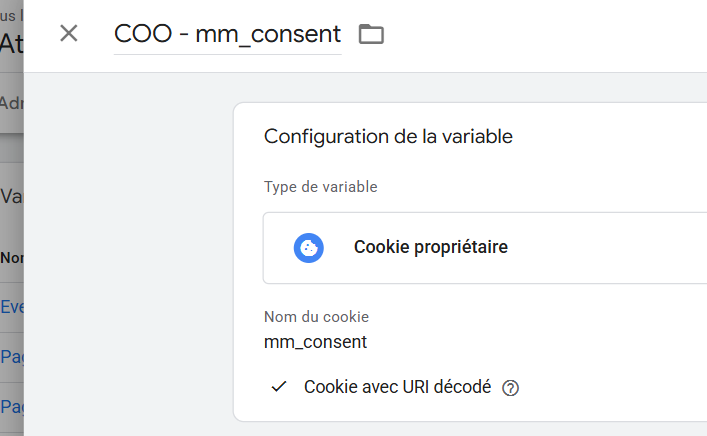
2/ Decode it and parse it as JSON.
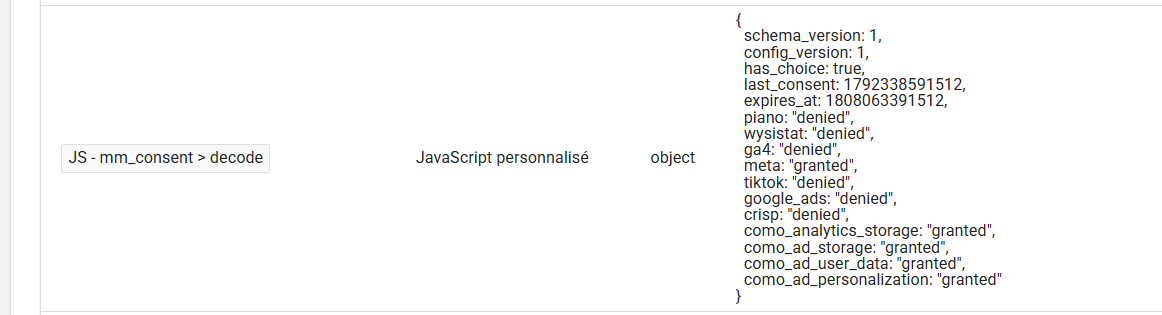
3/ Have one variable per vendor.

Tags that fire on page views
Here, since we’re relying on a cookie, nothing could be simpler to read. Each tag fires on a page view / DOM Ready trigger, with a condition on the cookie. Simple as that.
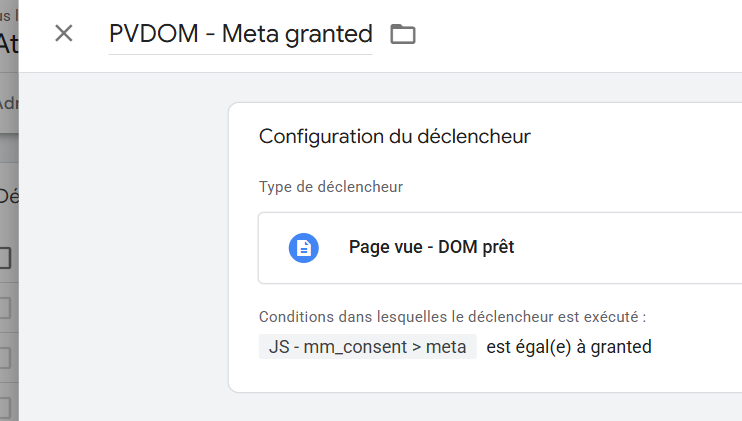
You may well have a “pageLoad” / “appLoad” event pushed with your initial data layer, containing page information, environment details, etc. Obviously, that’s absolutely fine. You can use exactly the same logic.
I know most CMPs expose a “cmpReady” event once their SDK has loaded, and recommend using the consent pushed into the data layer. And for events that might be pushed before that SDK loads (“purchase”, “view_item”…), naturally you need a trigger group to make sure you have both the event pushed by the CMP and the one pushed into the data layer (“purchase” + “cmpReady”).
Well, I’m sorry, and even though I know this is the platforms’ official recommendation, this approach is very objectively a magnificent way to shoot yourself in the foot:
- A page tag is far too crucial, and waiting for that CMP event imposes an unnecessary bottleneck. If a user blocks the domain that loads your CMP’s SDK, the event never fires, the trigger group is never evaluated, and you’re screwed.
- Reading a cookie really isn’t the hardest thing in the world. The cookie is there, available when the page loads. We might as well use it.
- Trigger groups are great, but when we can avoid them, we do, because they can spring a few nasty surprises. A typical e-commerce example: a dataLayer.push sends a “purchase” with all the right e-commerce information, then the “cmpReady” event is pushed. You have a “cmpReady” + “purchase” trigger group, which is therefore evaluated later. Except that in the meantime, the “ecommerce” object has been cleared for some other push. When the trigger group fires, you can no longer read the transaction information. Your product information is missing. And don’t tell me this is an edge case: clearing the “ecommerce” object is an official recommendation in Google’s documentation, and I had a very official argument about this with a major platform’s support team just last year (if they recognise themselves, it wasn’t personal).
- The other problematic case is an event that can fire multiple times per page, say “add_to_cart”, or “route_change” in a React, Vue or other app. Woe betide the consultant who tried to play it extra safe with “add_to_cart” + “cmp_load” trigger groups. As a reminder, a trigger group can be evaluated once and only once per page. In this setup, the tag can therefore fire only once, meaning a user adding several products to their cart on a listing page won’t have all their actions recorded.
Tags that fire on acceptance
Of course, we need to handle consent changes in the broad sense, meaning mostly first consent, but also possible subsequent changes. Remember, we distinguished those two cases in the data layer.
Here, however, we’ll rely on the event pushed into the data layer.
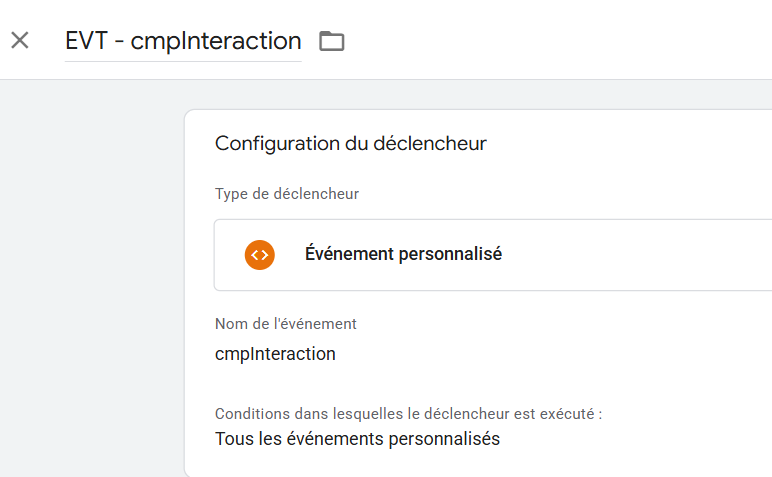
For our page view tags (GA and others), we can go about this in two ways:
- Either we have a page view tag with two triggers (one on DOM Ready or equivalent, one specifically for this “cmpInteraction” event).
- Or, and this is my preference even though it’s slightly more verbose, a page view tag on DOM Ready and a dedicated consent-change tag with an explicit name (
consent_changed, for example).
As a useful reminder, with advanced CoMo, even if the first page view tag fires with G100 (all categories denied), if a new event is sent on the same page with the appropriate consent, GA will backfill and can recover the source and all the rest.
The Gtag case
Although platforms now tend to manage Gtag themselves, I prefer doing the mapping in GTM when possible. Why? Because the way Gtag works in GTM fundamentally bothers me. While Meta / TikTok tags have clearly visible conditions, Google’s are handled through “tick a box and trust us, pinky promise, even though it fires all the time, no cookies will be set”. At least if we manage CoMo in GTM, we have precise control over the mapping between what’s in the CMP and how it communicates with Google’s tags.
So first we need to read the different CoMo categories. You get the idea, I’m not going to introduce you to the whole family:
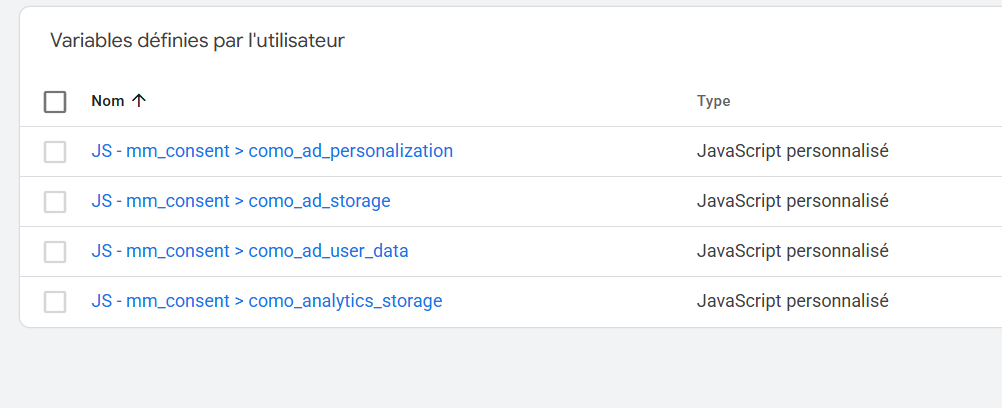
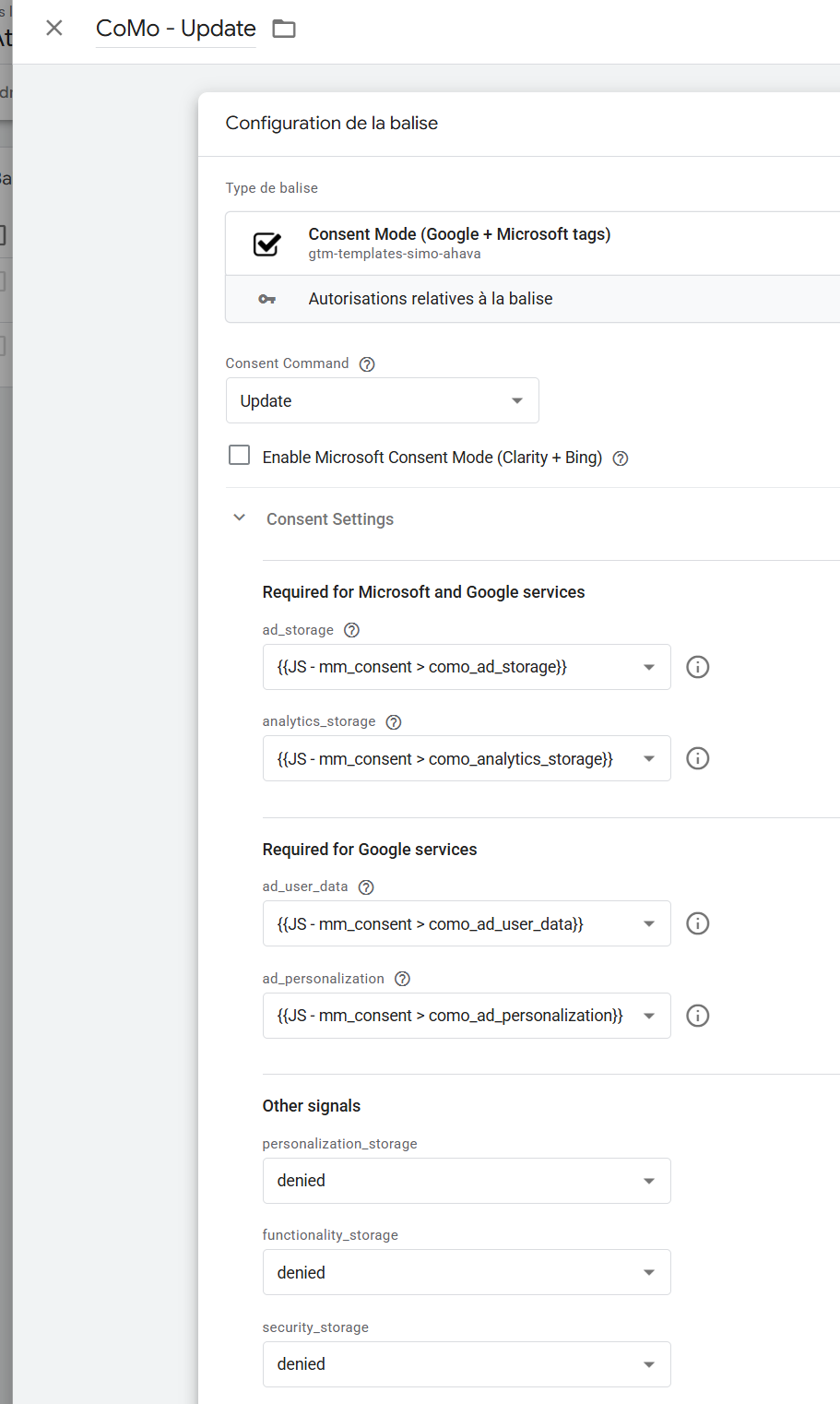
Next, we’ll need two tags, using Simo’s now more-or-less official “Consent Mode (Google + Microsoft Tags)” template (please stop putting Gtag calls in custom HTML in GTM, I’ve seen it far too often and had many genocidal urges): one “Default” as early as possible when the page starts loading, and the other at update time.
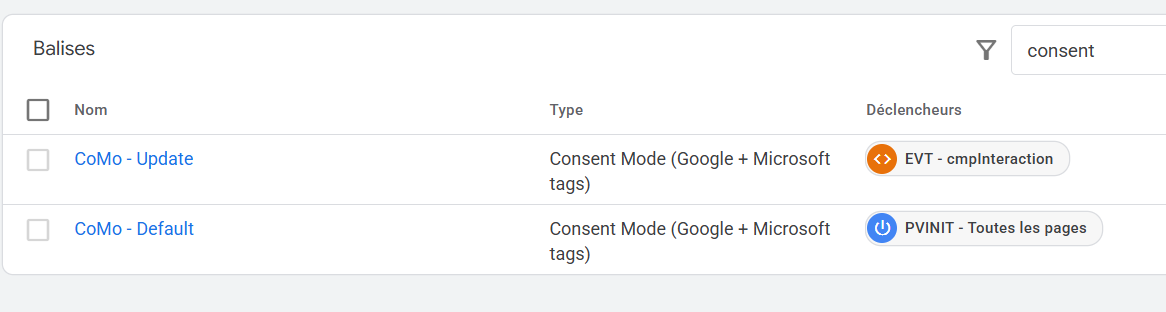
The beauty of it is that, since our cookie is the one and only source of truth (I think you’ve got that by now), these two tags are basically identical:
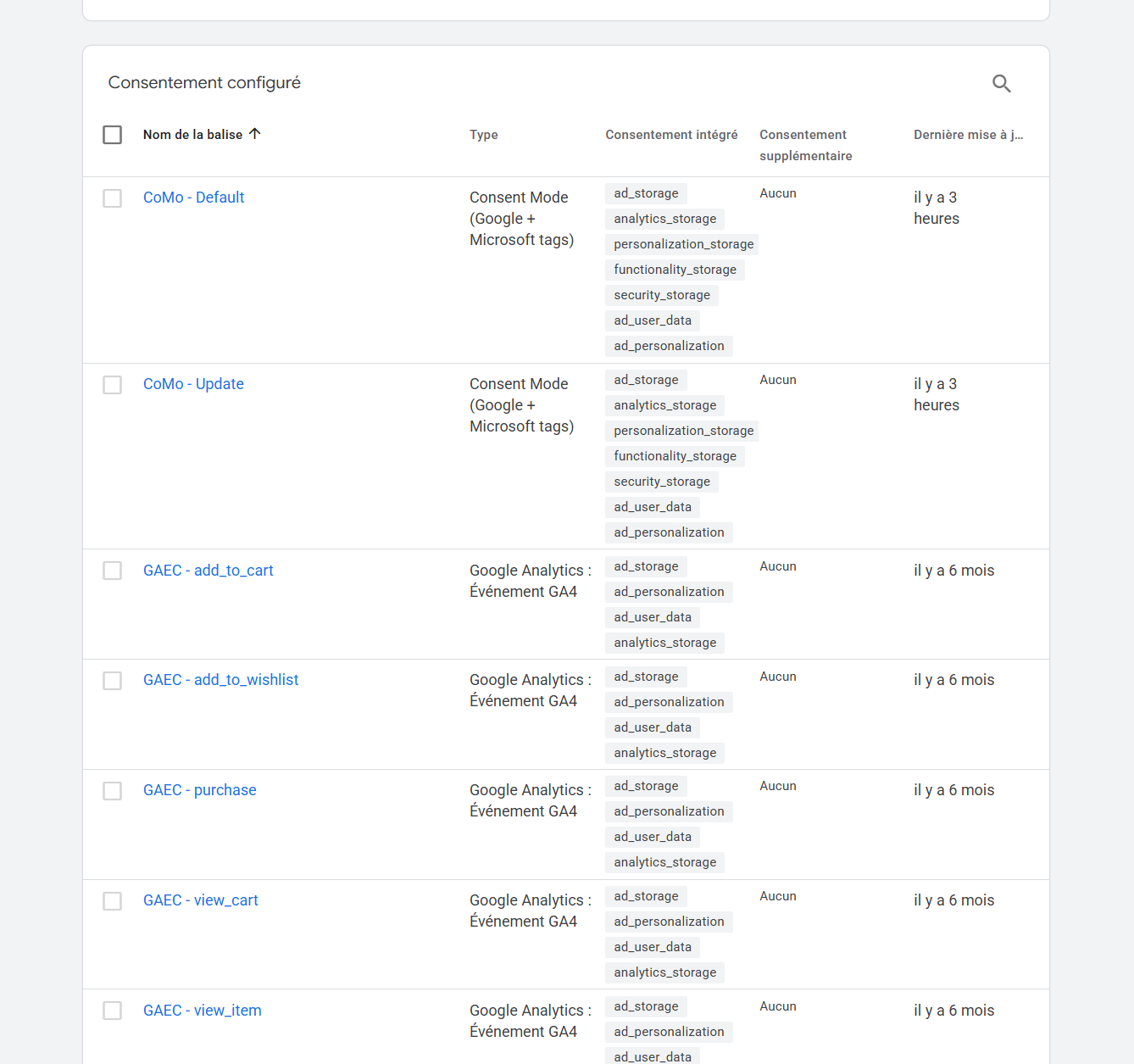
You’re big (boys|girls), so don’t forget to map “Built-in Consent” to every tag that requires it:
Now, if you’re absolutely determined to hard-code the CoMo-related Gtag calls alongside the dl.push calls, I won’t hold it against you. It doesn’t radically change the issue either.
Of course, this applies to advanced CoMo. If your DPO is more Catholic than the Pope (or more CNIL than the CNIL, in this case) and you want basic CoMo, you’ve earned the right to create an exception trigger. After all, we get the implementation we deserve.
And you know what? That’s it. Basta. Terminado. Abgeschlossen. All without a trigger group from hell or tag sequencing “just in case”. Without digging into the seventeenth level of the interface to check that CoMo is being sent properly.
Server-side in seven and a half words
Yes yes pass consent in a param
The SKILL
I mentioned vibe coding at the start of this blog post. But here we’ve talked a lot about coding and considerably less about vibe. So you can absolutely stop here, take this article to the monthly Steering Committee, which can approve the budget allocation to put it on the roadmap, so that in Q4 the Client Design Centricity EMEA team can prepare Figma mockups to integrate it into your Bootstrap 3.16, provided it gets approved in PIP.
OR ELSE.
Damn it, it’s 2026. So I’ve written you a Skill, available by following this hyperlink: https://github.com/aristideriou/agent-skills/blob/main/README.md
The repo is MIT-licensed, so you can use it, fork it, give it to your nephew for his christening, send me messages telling me how handsome and intelligent I am, or do none of those things because you’re happy with your current CMP.
As explained in the docs, you can install it with a simple npx skills. It’s a friendly and fairly chatty Skill, since it’ll ask you questions about categories, descriptions and a few other things. And at the end, it spits out a CMP.
I created this little website I use for demos, where you can see what it looks like. Of course, the whole point is that it adapts to your design, so its appearance will depend on what your codebase looks like.
Naturally, I see this repo and Skill as a lightweight, minimalist solution, highly optimised for GTM. And although I have extensive experience with these tools, I’m not a lawyer, so please don’t sue me because you’ve received a formal notice, or because your CISO complains that this solution isn’t ISO 980001-certified (it’s probably not even ISO 1-certified, assuming that exists).
What I can guarantee, however, is that this CMP gives you no third-party library requests, a design consistent with your website, a lovely little cookie that doesn’t set your headers on fire, web performance that stays excellent, and above all, ABOVE ALL, a cost of €0. €0 per month, or on an annual basis, because you’re lovely and I know you well, €0 per year.
Work in progress
I’ve deliberately left out certain features that could be handled, but which I’m keeping up my sleeve for a later version:
- The latest little trend in CNIL formal notices has highlighted a tricky but interesting point: they recommend that if someone accepts then rejects cookies (yes, absolutely nobody does that, I know), previously set cookies should be cleared. This could be handled either by the CMP itself or possibly with a clever little GTM script.
- A monitoring dashboard (consent rate, no-choice rate) in the style of Didomi: this could be built with a small Cloud Function or equivalent writing to a BQ table, to which you could connect a data visualisation tool, or build a little interface with your favourite vibe coding tool. The challenge will probably be having a Cloud Function beefy enough to handle hits proportional to your website’s traffic.
And you, have you vibe coded any CMPs? Drop a comment!
Of course, it’s entirely possible I’ve missed some glaring use cases beyond what I mentioned at the start of the article, which I think works very well for organisations of a certain complexity. There may be holes in my thinking, so feel free to contact me or send a little PR to the skill’s repo.