
I have a terrible confession to make: we don’t talk about Stape enough in France.
Stape? The civil parish in North Yorkshire (yes, there’s an actual anecdote behind that)? Nooo, Stape, you know, the server-side solution with the funny orange logo! Yes, that Stape, which, according to my calculations of absolutely no scientific rigour whatsoever, is pretty much the leader in server-side GTM. Here in our lovely country (and perhaps elsewhere too; I haven’t checked Kazakhstan or Burundi, for example, lack of time), it often gets a reputation for being a slightly budget option. When actually, well, no. Not at all. Quite the opposite, in fact, as I’ll try to show you in this article.
This article was written without AI (well, almost)
No em dashes were harmed in the writing of this article, and the dubious puns, repetitions and wildly overlong sentences were produced by my own chunky fingers on a device known as a Logitech keyboard.
That said, I’m not a caveman either. I do use whichever LLM happens to be within reach (Codex at the moment) to:
- Corect teh speling misstakes
- Smooth out awkward phrasing
- Spot repetitions, something I’m rather fond of to begin with
- Generate article summaries / tables of contents
- Translate into English
The bit where we do the disclaimers
Disclaimer number one
Yes, this article is written in collaboration with Stape.
Stape? The civil parish in North Yorkshire?
No, OK, sorry, I’ll stop dragging that joke out: Stape, the same people as before, the server-side folks. Have I become just another bargain-basement influencer who can be bought? Should we expect a future Might & Metrics X NordVPN collab? And wouldn’t Dubai ultimately be a bit more chill than Brittany, weather-wise?
I’m not entirely in a position to give exhaustive answers to all those questions. But 1 - It’s my website, I do what I like, and above all 2 - I would have written some version of this article sooner or later anyway. Even beyond the tool itself, at a time when Google Analytics has apparently challenged itself to find time every month to release a feature even less eagerly awaited than the previous month’s, what’s happening around sGTM is genuinely bringing back that feeling from the glory days of Universal Analytics, when the community created incredible momentum and every release was as eagerly anticipated as the next Avengers film. Anyway. I like Stape, all right? I’m not going to spend three hours justifying it.
Disclaimer number two
If you already know Stape, you can, and probably already have, skipped ahead and skimmed this article: you know it’s the good stuff. But if you’re in France, you’re also quite likely to be more familiar with AddingWell, which I couldn’t not mention here (that’s a double negative, but it adds a certain charm). The other reason I’m very comfortable writing this article is that I absolutely don’t want to pit one tool against the other: I also work with AddingWell every day. It shares many of Stape’s features, is also excellent, and fortunately doesn’t need my help to maintain its thoroughly deserved reputation in the French market. I’ve heard plenty of reports of very healthy competition between the two, which is probably why they’re raising the bar for this lovely server-side market. Love you both. Just a little more love for Stape right this second, because that is, broadly speaking, our subject.
First, what are you actually buying from Stape?
Right, if you’re here, you probably have a rough idea of what server-side GTM is: your media agency has probably given you the usual sales pitch lie about how server-side will deliver an extra 417.6% incremental ROAS in Q2 (spoiler alert: they don’t know how to measure ROAS and they do all their reporting in Excel 2017). Then your CISO told you sGTM absolutely had to be hosted on your own infrastructure, because security, governance, and above all they need something to put on slides for the next executive committee meeting. Until they realised the IT department’s AS/400s were apparently 614 versions behind the Docker image sGTM requires, at which point they gave the cloud the green light, with reservations. That’s server-side, more or less.
Well, Stape does all that stuff too. But since we’re talking about hosting and governance, here’s an interesting and rather unusual point in this market: you can choose to host Stape on Google Cloud, or in Europe, even in our lovely country #ouiOuiBaguette, with Xavier Niel. Not at his actual house, obviously, that would be a bit intrusive, but at Scaleway. You might ask: what’s the point? Obviously I’m not a DPO, because I’d like to hang on to a little sanity for a few more years. But the more adventurous among you probably remember the CNIL’s legendary bout of overreach around 2022, when France’s data protection authority decreed, like Benjamin Pavard appearing at the far post of privacy, that Google Analytics was illegal because it ran on an American company’s servers. After the entire analytics community had worked through every stage of grief (“Oh no, I’ll have to become an account director”, “The Council of State will never approve this anyway”, “My smart fridge sends data to AWS, how am I supposed to keep my Picard frozen pizzas cold in this cruel world?”), things calmed down a bit and the CNIL decided to dedicate its 2026–2034 roadmap to email pixels and the size of “Accept cookies” buttons in CMPs.
Through a process that looks suspiciously like black magic to me, and which I would be quite incapable of explaining rationally (actually, Terraform), Stape Global (parked at Google Cloud) and Stape EU (at Free, sorry, Scaleway) cost exactly the same. However, for fairly obvious reasons, if you have clients on both, you’ll need two separate Stape accounts, with an alias along the lines of jean-michelEU@jeanmichelconsulting.com.
Pricing: if it’s free, you’re the product prospect
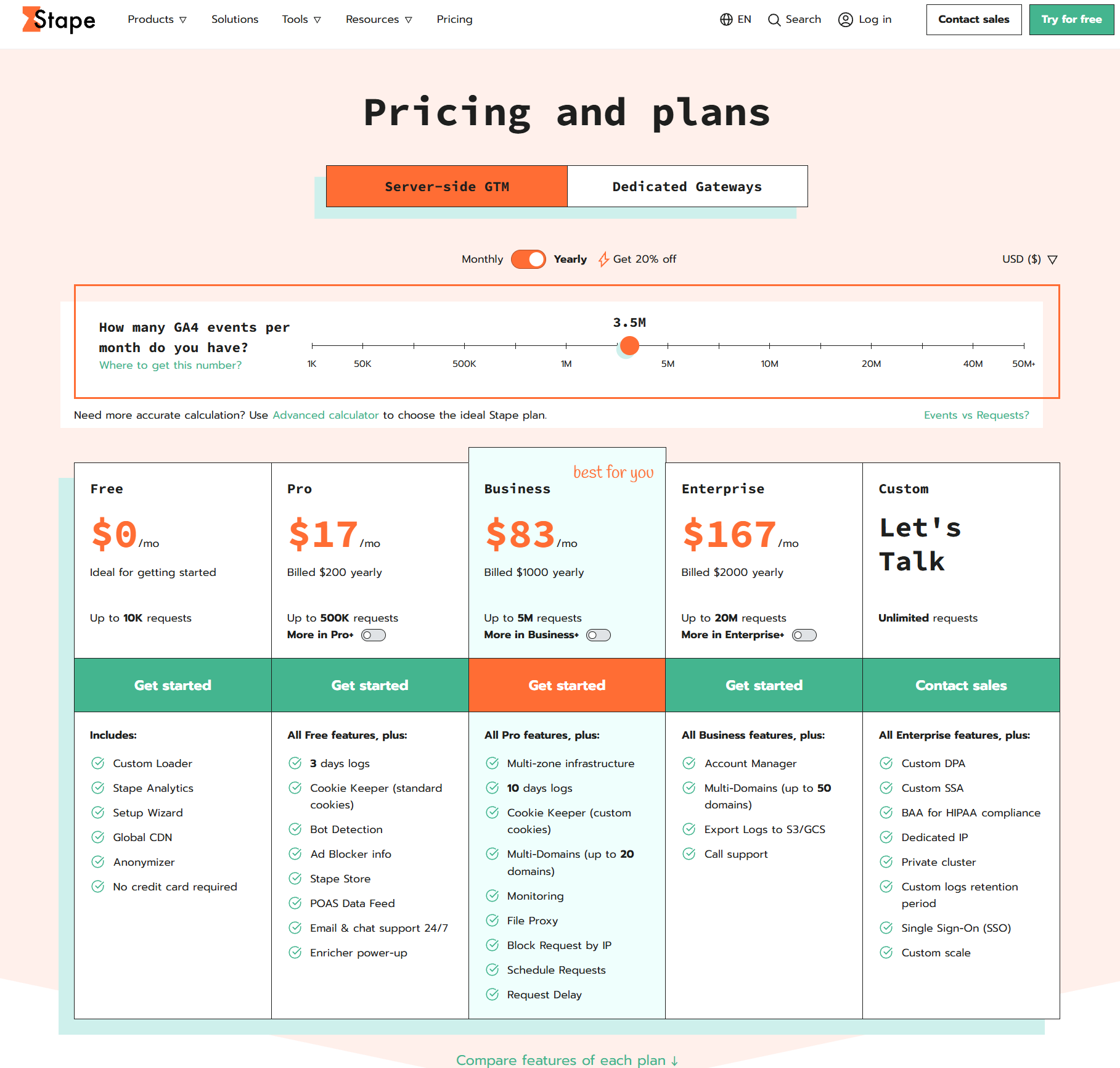
Why, thank you for that lovely segue, I was just about to talk about pricing. I’ll naturally point you to the pricing page, with all its fun sliders for working out what Stape would cost for your event volume. Beyond the actual rates, which you can judge for yourself because you should, after all, be capable of basic arithmetic and have at least a vague idea of your monthly incoming hit count, bear in mind that Stape’s tiers have a few particularities:
- You can start with a free version, for up to 10,000 hits a month. Yes, free. Perfect for a PoC, or those few weeks when your site still isn’t live because the client asked for a bigger logo, a bigger footer, and a more impactful logo. And also a cleaner website. Or simply “lost” their bank card.
- Much like Axeptio, pricing depends not only on hit volume but also, and please pay close attention here, on which Power Ups are available. More on those below, but you might theoretically fit into the “Pro” plan at 17 eurodollars a month while needing Multi Domains, which is available on Business. So watch out for that.
- If you have a lot of traffic (over 20 million requests a month), Stape can put together a tailored offer, which, from what I’ve seen so far, broadly follows the “Enterprise” pricing structure.
The power-ups
Now for the meat of this advertorial (please don’t hit me): the Power Ups. I don’t think I need to draw you a picture. You have various options, you enable them (or don’t), customise them (or don’t), and you’re happy (or not, but in that case, just don’t enable them). If you don’t know Stape, or only vaguely, I suggest getting a feel for what’s available through this very informative list.
Rather than write an exhaustive list that wouldn’t improve on the page above (and let me mention in passing that Stape’s documentation is generally excellent, though I’ll probably come back to that another time), I’ll try to share some hands-on experience, with real use cases and, above all, a completely objective and scientific score for each module. To help you find your way around, I’ve reused the Power Up categories from Stape’s interface.
Web GTM load
Custom Loader: this is where it starts
Custom Loader is the MVP of any self-respecting sGTM implementation. It loads GTM and GA4 scripts through your collection domain, using modified paths. It also offers enhanced ad blocker protection, changing the shape of requests to make them less recognisable to filtering rules. In practice, you go from https://www.googletagmanager.com/gtm.js?id=GTM-ABCD1234, which basically says “come on, dear ad blocker, slap me with those lovely big hands of yours”, to a URL less readable than the Wi-Fi SSID of your neighbour Pascal, who spends his evenings on Linux forums. Stape offers what is, to my knowledge, the cleverest and most robust obfuscation on the market: even “/collect?v=2” ends up hashed in base64, looking something like “d?66ea9bc3=L2d0YWcvanM%2FaWQ9Ry05WVkwNVpITUU5JmN4PWMmZ3RtPTRlNjlnMQ%3D%3D” (you’re the L2d0YWcvanM%2FaWQ9Ry05WVkwNVpIT).
That said, bear in mind that despite this clever solution, it doesn’t bypass every ad blocker. Ultimately, this is a game of cat and mouse (although I’m struggling to work out whether the ad blockers are the cat, the mouse, or a bit of both).
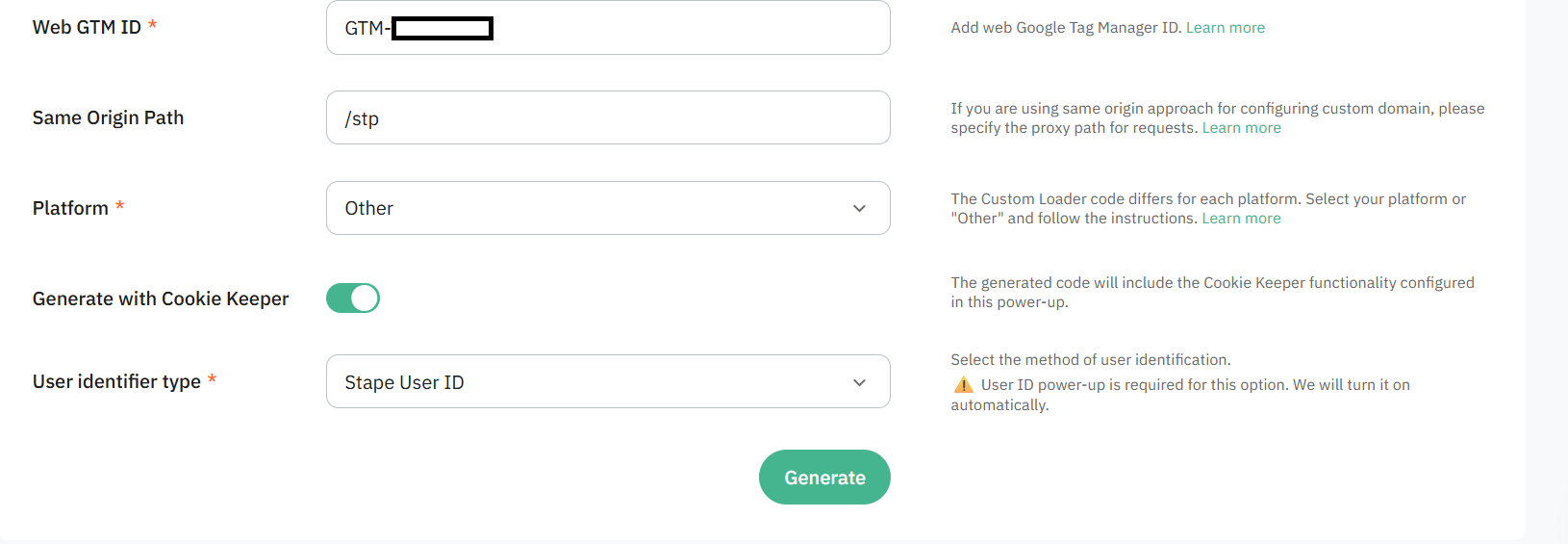
You can take things even further with a “Same origin path” which, with a little plumbing at your hosting provider (a Cloudflare worker, basically), lets you actually do what Google Tag Gateway so clumsily promises. The Wish version of server-side, if you will (that was uncalled for, but deserved).
It’s often a very worthwhile quick win, given how heavily GTM gets blocked and what an enormous bottleneck that creates.
👨🏫 I give this Power Up a score of If you don’t do this you clearly have no self-respect / 20
Cookie Keeper: not just a pretty name
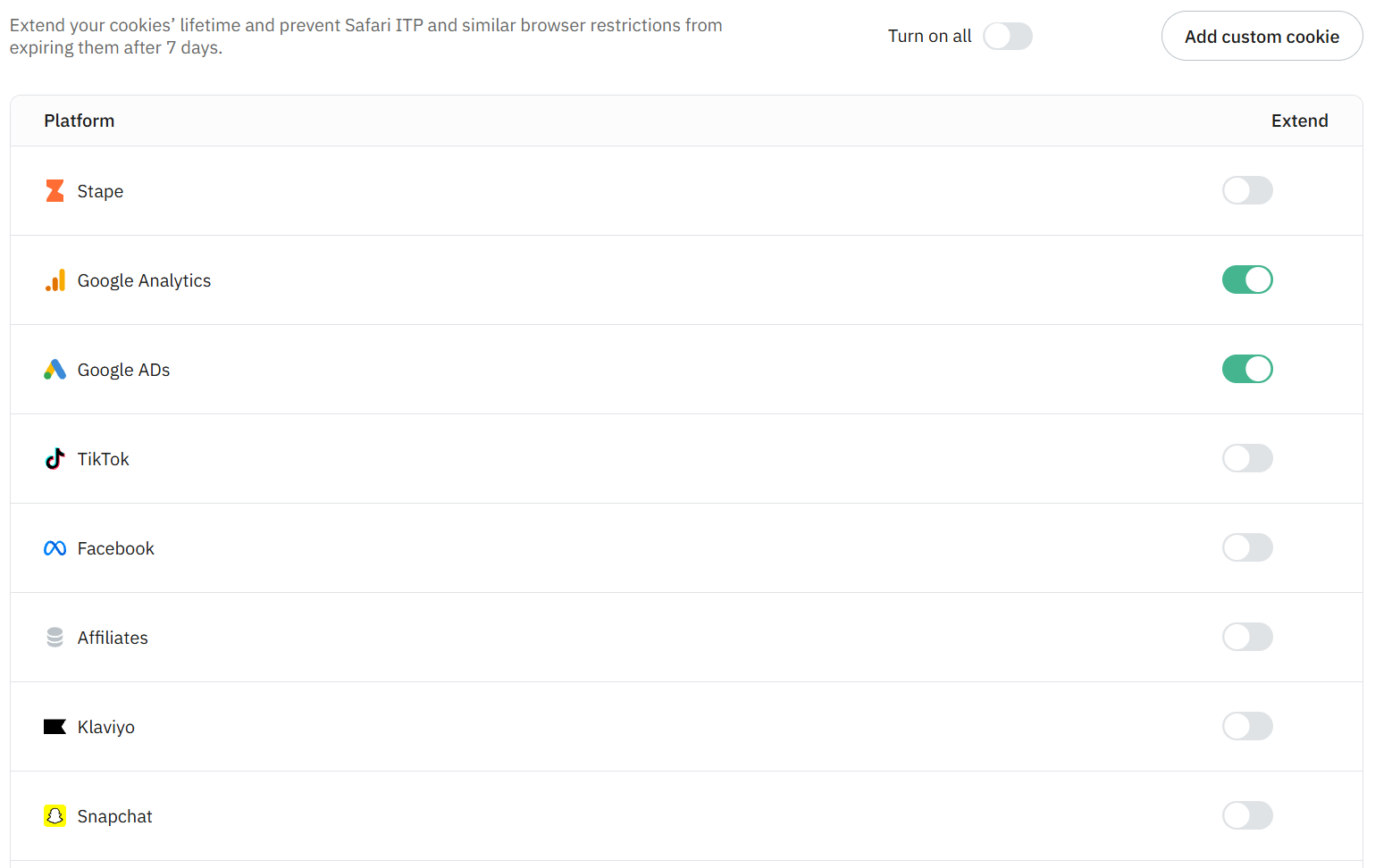
Cookie Keeper aims to keep certain first-party cookies going despite browser lifetime restrictions, particularly Safari’s. You can select the cookies concerned and, depending on your plan, configure custom cookies.
I think it’s simple, elegant, and ridiculously powerful. Essentially, you can give Safari the finger when it tells you the GA cookie lasts somewhere between 7 and 14 days, depending on its mood. Once again, perhaps your DPO will produce a rigorous, properly sourced and entirely paranoia-free analysis explaining that the CNIL’s Minitel terminals might potentially use a proprietary algorithm to conclude that you aren’t strictly respecting browser behaviour. Who am I to say such things, after all?
And since a technical explanation is never as good as a good old meme:

👨🏫 I give this Power Up a score of It’s Good But DPOs Hate It / 20
Multi Domains: multiple domains, one container
Multi Domains lets you connect several custom domains to one container. If your group runs brand-a.fr and brand-b.com and wants to share its sGTM infrastructure, the need becomes obvious pretty quickly. Domain limits depend on your chosen plan.
This Power Up is pretty much essential when you have different top-level domains, remembering that you’ll need to set up the appropriate CNAME each time. To be completely thorough, and for the penny-pinchers in the audience, I should add that you could perfectly well own mysite.fr, mysite.com and mysite.de, while sending your server-side tags through mysite.io. After all, it’ll still be less bad than GOOGLE TAG MANAGER DOT COM, which is basically saying “Yes, OK, I was asking for it”.
👨🏫 This Power Up gets a score of Your call / 20
Anonymizer: wasn’t meee
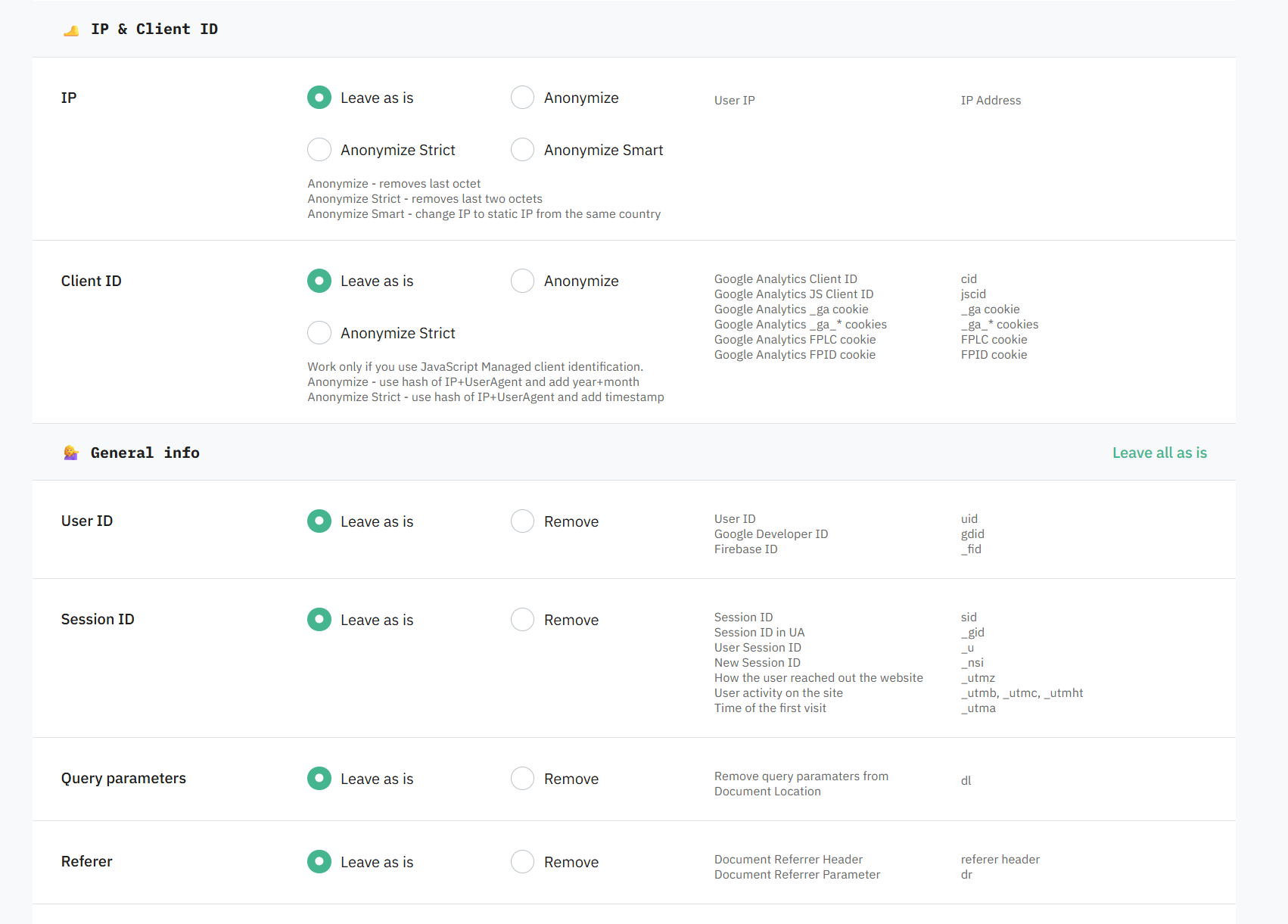
Anonymizer lets you modify, mask or remove certain fields destined for GA4: IP-related information, identifiers, URL parameters or technical characteristics, depending on your settings.
This module fits nicely with what I said earlier about the, shall we say, slightly strained relationship between Google and regulators across Europe. Combine Stape EU with a number of masked fields proportional to your DPO’s aforementioned paranoia, and you’ve probably got the safest combo going into your next formal notice from the CNIL 😍
👨🏫 This Power Up gets a score of The CIA can’t really spy on me anymore / 20
CDN: File Proxy
File Proxy lets you serve an external file from a path on your sGTM domain and set its cache duration.
A “little” Power Up that can come in handy for serving, in a first-party context, libraries used by tags that absolutely have to run on the front end. Ideally, and whenever possible, I obviously prefer proper first-party hosting on our own CDN, but when that is impossible, we take what we can get.
Watch the cache duration too: it is convenient, but you can get an unpleasant surprise if you set a very long cache lifetime on a file you want to change (typically an analytics SDK version upgrade or something similar).
👨🏫 This Power Up therefore gets a score of We’ll take what we can get / 20
Utilities
sGTM Preview header config: better than hacking your router
The preview header configuration power-up lets you see requests in the sGTM debugger that don’t come from your website’s preview session: a mobile app, backend, webhook, and so on. You enter the token, with the option to target a path or an IP. It’s particularly useful when you can’t easily add the X-Gtm-Server-Preview header to the original request yourself.
I was a little sceptical about this one for a long time, but the day I actually had the use case in front of me, I saw the light. The use case? Server-side tracking on a React Native app, with no way for me to rebuild it locally, where I needed to quickly validate tags being sent to Google and Meta. Obviously, you probably won’t use it every other day, but it’s very useful for seeing the raw flow.
👨🏫 Logically, this Power Up gets a score of App tracking is still hell on earth but now slightly less so / 20
Block Request by IP: useful in the right place
Block Request by IP lets you exclude addresses from being processed by the container. It can help with an identified unwanted source or test traffic.
Now, disclaimer (yes, another one; the number of disclaimers per square metre in this article is becoming embarrassing): if you’re having problems with weird traffic in GA, you should always start by trying to exclude it upstream. Cloudflare and friends have plenty of tools to do this perfectly, at whatever level of detail suits you. Patching it in your analytics tool is still putting a plaster on a wooden leg.
As for the rest, I don’t need to draw you a picture. It blocks IPs. Not the most exciting thing on the internet, but it can help if you have a very specific GTM blocking requirement, or while you’re waiting for the Cloudflare block to go live.
👨🏫 After careful consideration, I give it a score of “Yes right it’s an IP exclusion no need to make a song and dance about it / 20”
Google Service Account: your GCP credentials deserve a decent home too
The Google Service Account power-up lets the container authenticate with Google Cloud services, such as BigQuery or Firestore, using a service account.
Possibly the most underrated Power Up on the roster. The idea is to give your sGTM container write access to pretty much anything in GCP. One particularly useful application is a little BigQuery monitoring setup, for example if you want to keep an eye on data layer values and, since you’re not a kamikaze, aren’t sending plaintext credentials to the front end.
But of course, BQ is only a small part of the ecosystem. If you want to start doing custom things with Cloud Functions, for example building a little homemade reverse ETL to call an API when tags fire, with much more freedom and control than native sGTM templates offer, this Power Up is there for you.
👨🏫 Logically, Google Service Account gets a score of Come on over to GCP it’s lovely lovely lovely / 20
XML to JSON and Dedicated IP: specific needs
XML to JSON converts XML data received at the designated endpoint into JSON for use in sGTM. If you need to integrate a system that speaks XML, this can save you writing the conversion yourself.
The same goes for Dedicated IP. The principle is clear: send outbound container requests through a static IP, particularly when a destination API requires an IP allowlist. This is a custom paid option, activated by Stape.
I’m certainly not going to tell you what to do with these, but it’s exactly the sort of requirement that might be lurking in project_scoping_notes_final_v3_final.pptx. Incidentally, I’ve empirically observed that the correlation between using _final in PowerPoint filenames and the presence of XML is close to 1 in the hot IT departments in your area. Have you noticed that too?
👨🏫 Not feeling particularly inspired, so we’ll settle for Ask yourself some questions if you’re still using XML / 20
Open Container for Bot Index: not convinced for my own use cases
Open Container for Bot Index removes the default restriction preventing search engine bots from accessing the container.
Turbulence isn’t far away here, given the sheer volume of bots any respectable website (or a fairly disreputable one, for that matter) can get hit with. Or perhaps you’re bold enough to monitor bot traffic through Google Analytics (something that generally ends badly, but I do love an adventurer).
👨🏫 So we’ll go with Why not if you work at the ACPM, France’s media circulation auditor / 20
Request Delay
Request Delay lets you postpone the processing of incoming events.
WARNING: DANGER ZONE
The use case is fairly obvious: wait, for example, for an actual callback from your payment platform before sending an order to GA or another advertising platform. That said, if you have even a little intuition, you can probably imagine all the trickery that might be hiding behind this kind of feature.
👨🏫 Verdict: I accept no responsibility for everything you might do with these Power Ups / 20
Schedule
Schedule triggers requests to a container path on an hourly or daily basis.
Data enrich
User ID: technically interesting, worth a close look
The User ID power-up generates an identifier from several signals, including IP, user-agent, hostname and TLS parameters.
Yes, let’s call it what it is: we’re clearly talking about fingerprinting, sent entirely server-side, without setting a cookie. I don’t need to spell it out. This is relatively robust, simple to set up, and fairly hard to detect. In practice, it’s an event parameter added on the server, and you’re free to use it for whichever purpose and tool suits you, with the appropriate consent, of course.
👨🏫 Essentially: Yes well it’s fingerprinting what do you want me to say / 20
Bot Detection and Ad Blocker Info: it’s my life, I’ll enrich or filter if I want to 🎵🎵🎶🎶🎵
I’m putting these two together, since they work in fairly similar ways:
Bot Detection analyses incoming requests and provides detection signals, including a score. You can then use them in the container and pass them to an analytics tool.
Ad Blocker Info adds an ad blocker presence signal through the X-User-Adblocker header. It requires Custom Loader to be configured first.
These two Power Ups are among the essentials I set up almost every time. Depending on the situation, you can use ad blocker / bot detection to populate a property / custom dimension or to filter potentially suspicious traffic (mainly bots, to be clear; don’t go filtering out users with ad blockers, you might run into a problem or three).
For bot detection in particular, you even get both a binary indicator and a score out of 100, if you want to judge the “probability” of a given hit coming from a bot.


The advantage is that all of this happens entirely server-side, saving you an obscure ad blocker detection library on the front end. Naturally, if the request is blocked upstream, it’ll never reach the server, so this isn’t an excuse to skimp on the proxying and related work discussed above.
👨🏫 The score is It’s good and it saves you making a mess of your data layer / 20
GEO Headers and User Agent Info: enrichment for a specific purpose
Once again, let’s put two Power Ups together:
GEO Headers adds geographical information derived from the IP. You can use it to condition server-side processing, for example based on the estimated country. This isn’t an exact location: a VPN, mobile network or imperfect database can affect the result.
- X-GEO-Country
- X-GEO-Country-Name
- X-GEO-Region
- X-GEO-City
- X-GEO-PostalCode
- X-GEO-Ipaddress
User Agent Info exposes browser, system or device type information through headers. It’s handy for segmentation or diagnosing behaviour without rebuilding all the user-agent parsing yourself. Here’s the full list:
- X-Device-Mobile
- X-Device-Os
- X-Device-Browser
- X-Device-Browser-Version
- X-Device-Model
- X-Device-Platform
- X-Device-Engine
- X-Device-Engine-Version
Sending the full user-agent to an analytics tool can still be considered a little touchy, even if it’s useful for analysis.
Not much to add here. If you understood the previous section about ad blockers and bots, and haven’t wandered off to scroll through TikTok in the meantime, you should be able to see the point.
These can work quite nicely alongside the ad blocker / bot duo above.
👨🏫 That gives us a score of So basically the same as above / 10
AI Traffic Detection
Ooh, shiny and new, it’s just been released!
The idea is much the same as the other enrichment features, with attributes as follows:
X-User-AI: true or false
Indicates whether the request originated from an AI environment.
X-User-AI-Name: <AI name>
Included when a specific AI service is identified (for example, OpenAI).
It’s only just come out, and I haven’t had a chance to put it into production yet, but given the topics
Power Ups summary table
[Editor’s note: table generated with Codex]
For a quick overview, here are the Power Ups listed in the Stape documentation, including those I haven’t covered above. Availability depends on your chosen plan.
| Power Up | Use case at a glance |
|---|---|
| Custom Loader | Load GTM and GA4 through your domain and reduce blocking. |
| Cookie Keeper | Preserve first-party cookies despite browser restrictions. |
| Multi Domains | Share an sGTM container across multiple domains. |
| Anonymizer | Mask or remove data sent to GA4. |
| File Proxy | Serve a third-party script through your domain, with caching. |
| sGTM Preview header config | Debug requests from an app, backend or webhook. |
| Block Request by IP | Exclude test IPs or unwanted sources. |
| Google Service Account | Authenticate sGTM with BigQuery, Firestore or other Google services. |
| XML to JSON | Make an XML webhook usable in sGTM. |
| Dedicated IP | Call an API that requires an allowlisted static outbound IP. |
| Open Container for Bot Index | Allow indexing bots to access the container. |
| Request Delay | Postpone request processing by a defined amount of time. |
| Schedule | Trigger a recurring request, hourly or daily. |
| User ID | Generate a cookieless identifier from technical signals. |
| Bot Detection | Identify bots to segment or filter their traffic. |
| Ad Blocker Info | Identify traffic with ad blockers for analysis. |
| GEO Headers | Adapt processing to the estimated country or region. |
| User Agent Info | Segment by browser, system or device. |
| AI Traffic Detection | Measure AI-related traffic and identify its source when detected. |
| POAS Data Feed | Send margin values to optimise campaigns for profit. |
| Enricher | Supplement events with previously collected user data. |
| Click ID Restorer | Restore advertising click IDs through a fallback parameter. |
Logs and monitoring
Saving the best for last, because this is one of the real advantages sGTM has brought us: instead of sending bits of JS at the mercy of the browser, like a message in a bottle (or a text to your ex), we’re sending lovely POST or GET requests, which means we can monitor what comes in.
Logs
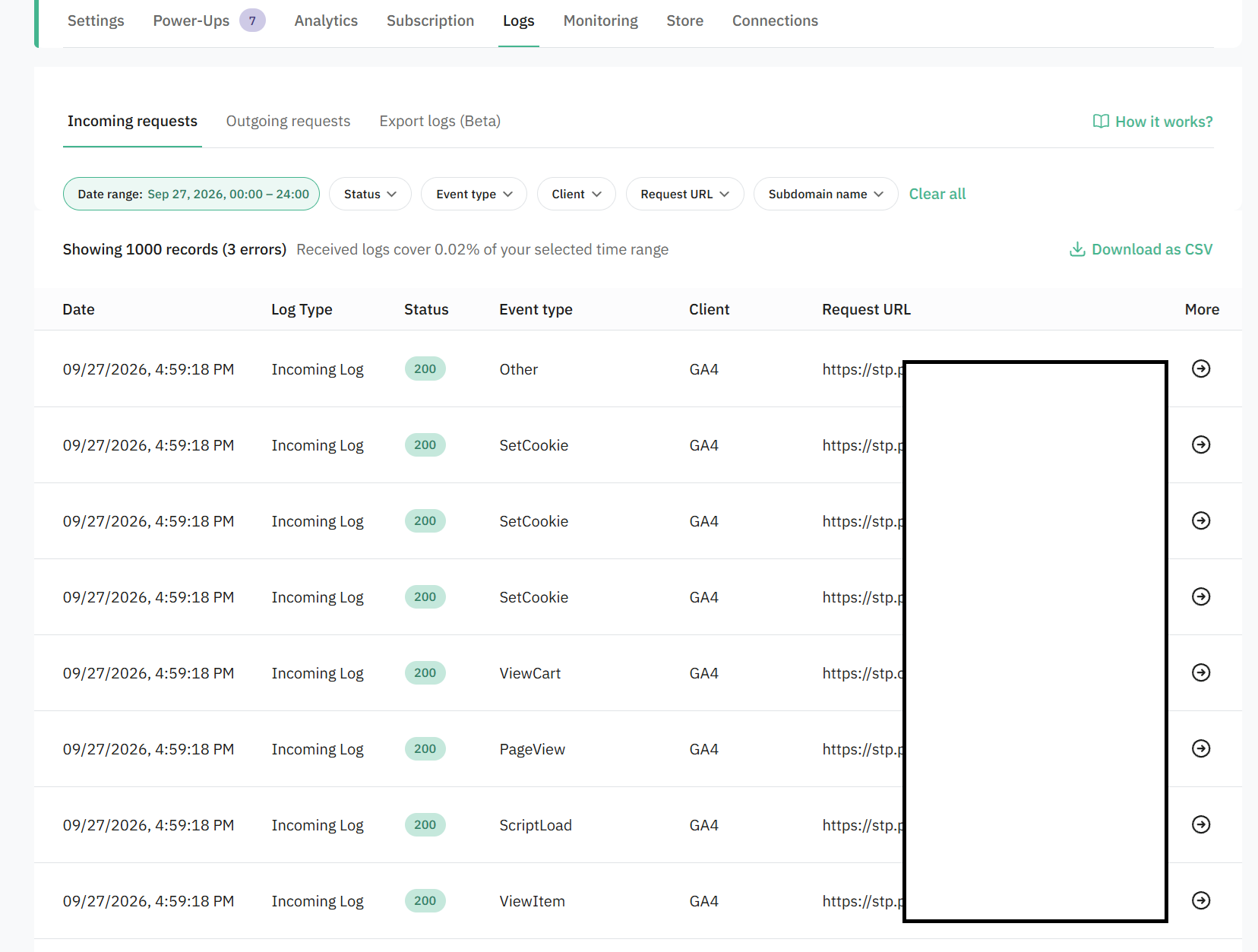
Like any self-respecting sGTM platform, Stape lets you inspect fairly raw logs. Where things get interesting is that you have both incoming and outgoing logs (provided you enable them first).
If you have evenings to spare, you can run these through your favourite analytics tool or Python library and build a little homemade monitoring setup. Otherwise (if you have a life, in other words), you can feed them to your favourite LLM, go and make a coffee, and come back later to discover that deploying that new TikTok EAPI tag at 6 p.m. on Friday was indeed a bad idea.
Monitoring
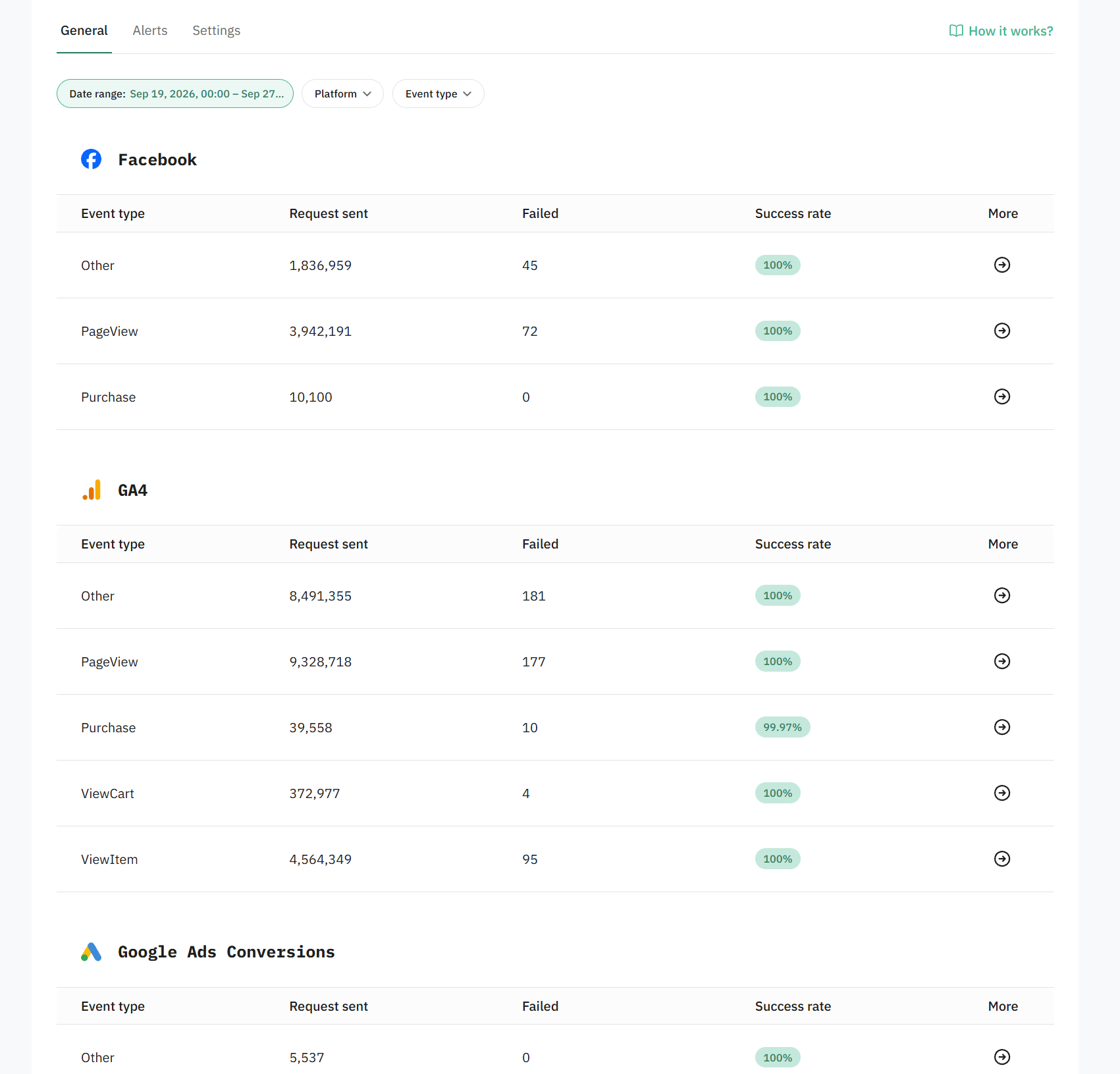
But the icing on the cake, or rather the finishing blow, no, what am I saying, the pom-pom on the beret, is that Stape recently added a gorgeous “Monitoring” tab, giving you a more visual overview of everything you’re sending to platforms. Obviously, it’s 2026, so you can set up alerts and all that jazz. Besides being easy on the eye, the interface lets you go from a high-level dashboard to raw logs, which is rather nice when you want to investigate CAPI tags and the like.
Conclusion
I hope this article has made you want to use Stape, or even use it better if you’re already familiar with it. Of course, I may have missed things or been imprecise, so feel free to get in touch through the usual channels if you’d like to chat about Stape (or other things). Incidentally, if you’re an extremely wealthy company or agency looking to implement server-side with controlled costs and plenty of implementation expertise, even better (from the perspective of my company’s bank account, I mean).
See you soon!